Brainware University Student Login: Empowering Academic Excellence through Digital Access

Brainware University, a premier private institution in Kolkata, West Bengal, is committed to providing quality education across diverse disciplines. To enhance the academic experience, the university offers a comprehensive Student Self-Service Portal, accessible at https://www.brainwareuniversity.ac.in/studentselfservice/. This portal serves as a centralized platform for students to manage various academic and administrative tasks efficiently.
Key Features of the Student Self-Service Portal
-
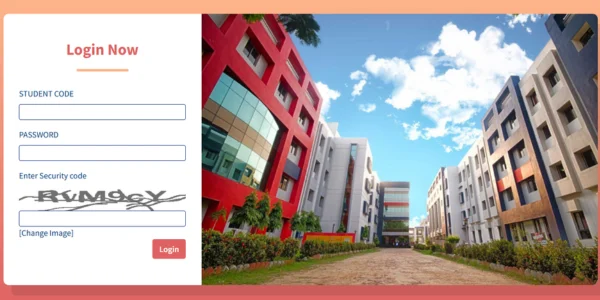
Secure Access: Students can log in using their unique Student Code and Password, ensuring the confidentiality and integrity of their personal and academic information.
-
Academic Resources: The portal offers access to essential academic materials, including syllabi, examination timetables, and results.
-
Administrative Services: Students can utilize the portal for various administrative tasks, such as downloading admission cards and accessing forms and fee schedules.
-
Attendance Monitoring: Students can track their attendance records, ensuring they meet the minimum requirements for examinations.
-
Student Support: The platform provides links to student support services, including remedial coaching centers, scholarship information, and grievance redressal mechanisms.
Benefits for Students
-
Convenience: The portal eliminates the need for physical visits to university offices, allowing students to access services from anywhere at any time.
-
Efficiency: By streamlining administrative processes, the portal reduces paperwork and accelerates service delivery.
-
Transparency: Students can track their academic progress and administrative requests, fostering a transparent educational environment.
How to Access the Portal
To utilize the Student Self-Service Portal, students should:
-
Visit https://www.brainwareuniversity.ac.in/studentselfservice/.
-
Enter their assigned Student Code and Password in the respective fields.
-
Enter the security code displayed on the screen.
-
Click the “Login” button to access their personalized dashboard.
In case of login issues, students are advised to use the “Forgot Password” option or contact the university’s IT support for assistance.
For any query you can reach accordingly;
- Ms. Bandana Basu, Librarian, University Library, Brainware University.
- Mobile: 9433151278,
- Email: librarian@brainwareuniversity.ac.in
- Mr. Sujan Bandhu Chakraborty, Librarian, Allied Health Science & Biotechnology Library, Brainware University.
- Mobile: 9163278886,
- Email: sbc.lib@brainwareuniversity.ac.in
Conclusion
The Student Self-Service Portal of Brainware University exemplifies the institution’s commitment to integrating technology into its educational framework. By providing a centralized, efficient, and secure platform, the university empowers its students to manage their academic and administrative responsibilities effectively. As Brainware University continues to innovate, the portal will undoubtedly play a crucial role in enhancing the overall student experience.