
St. Joseph’s University (SJU), Bengaluru, has embraced digital innovation to enhance the educational experience of its students. Central to this initiative is the Linways Academic Management System (AMS), a comprehensive platform that streamlines academic and administrative processes. The SJU Student Login portal, accessible at https://sju.linways.com/student/, serves as the gateway to this system, offering a range of features designed to support students throughout their academic journey.
Accessing the SJU Student Portal
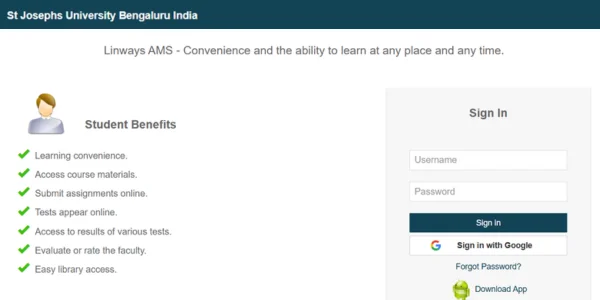
To utilize the Linways AMS, students can log in using their university-provided credentials. The portal offers two primary methods for authentication:
-
Standard Login: Enter your registered email address and password to access the system.
-
Google Sign-In: For added convenience, students can sign in using their Google accounts, facilitating seamless integration with other Google services.
Should you forget your password, the portal provides a “Forgot Password?” option to reset it securely.
Key Features of the Linways AMS
The Linways AMS is designed to centralize various academic activities, providing students with a user-friendly interface to manage their educational responsibilities. Key features include:
-
Course Materials Access: Students can easily retrieve lecture notes, presentations, and other learning resources uploaded by faculty members.
-
Assignment Submission: The platform allows for the online submission of assignments, ensuring timely and organized record-keeping.
-
Online Assessments: Students can participate in quizzes and tests directly through the portal, with immediate feedback and results.
-
Performance Tracking: The system provides access to grades and evaluation reports, enabling students to monitor their academic progress.
-
Faculty Feedback: Students have the opportunity to evaluate their instructors, fostering a culture of continuous improvement.
-
Library Integration: The portal offers easy access to library resources, including catalogs and digital materials.
Mobile Accessibility
Recognizing the importance of mobility, SJU has ensured that the Linways AMS is accessible on various devices. Students can download the Linways V4 app from the Google Play Store, allowing them to:
-
View timetables and attendance records.
-
Access course materials and collaborate with peers.
-
Receive real-time notifications and updates.
This mobile integration ensures that students remain connected to their academic environment, regardless of location.
Support and Assistance
For any technical issues or inquiries related to the student portal, students are encouraged to contact the university’s support services. Assistance can be sought through the contact details provided on the official SJU website.
University Office
Phone: 080 2227 4079, 080 2221 1429, 00919480811912
Email: desk@sju.edu.in
Admission Contacts:
- Phone: 080 2227 4079, 080 2221 1429, 00919480811912
- Email: admission@sju.edu.in
Hostel Office
- Phone: 00919480811925
- Email: sjuhosteladmission@sju.edu.in
Conclusion
The SJU Student Login portal, powered by Linways AMS, exemplifies St. Joseph’s University’s commitment to leveraging technology in education. By providing a centralized, accessible, and efficient platform, the university empowers students to take charge of their academic journey, fostering a more engaged and informed student body.