Gujarat Technological University (GTU), a premier institution in India, has streamlined its academic and administrative processes through the GTU Student Portal. This online platform serves as a centralized hub for students to manage various academic activities efficiently. Accessible via https://student.gtu.ac.in/, the portal offers a range of functionalities designed to enhance the student experience.
Key Features of the GTU Student Portal
The GTU Student Portal is designed to facilitate a seamless academic journey for students. Its primary features include:
-
Online Registration and Profile Management: Students can create and manage their profiles, ensuring that personal and academic information is up-to-date.
-
Exam Form Submission and E-Payment: The portal allows for the submission of examination forms and the convenience of online fee payments.
-
Result Recheck/Reassessment Applications: Students seeking re-evaluation of their examination results can apply directly through the portal.
-
Academic Bank of Credits (ABC) Integration: The portal is integrated with the ABC system, enabling students to manage their academic credits effectively.
How to Register on the GTU Student Portal
For students accessing the portal for the first time, the registration process is straightforward:
-
Visit the Portal: Navigate to https://student.gtu.ac.in/.
-
Create an Account: Click on the ‘Create an account’ link.
-
Enter Enrollment Number: Input your GTU enrollment number and submit.
-
Provide Required Details: Fill in the necessary information, including a valid email address and mobile number.
-
Agree to Terms: Read and accept the terms and conditions.
-
Complete Registration: Click on the ‘Register’ button to finalize the process.
Note: Students who have previously registered for result recheck or reassessment can use their existing credentials to log in.
Logging into the GTU Student Portal
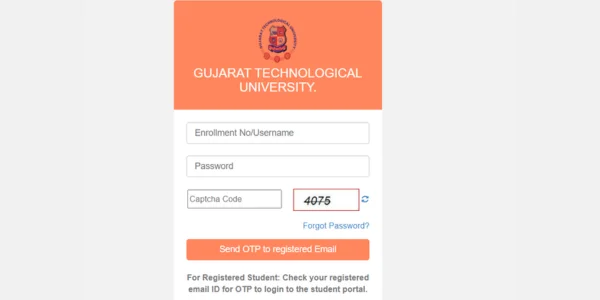
Once registered, students can log in using the following steps:
-
Access the Login Page: Go to https://student.gtu.ac.in/.
-
Enter Credentials: Input your enrollment number and the password received via email.
-
OTP Verification: An OTP will be sent to your registered email ID. Enter the OTP to proceed.
-
Dashboard Access: Upon successful verification, you will be directed to your personalized dashboard.
Managing Your Profile
The portal provides options to update personal information:
-
Changing Mobile Number: If you can log in, navigate to ‘Manage Profile’ to update your mobile number. If unable to log in, request your institute to update it on your behalf.
-
Updating Email ID: Similar to mobile number updates, changes can be made through ‘Manage Profile’ or by contacting your institute if login is not possible.
Submitting Exam Forms and Making Payments
To submit examination forms and make payments:
-
Log In: Access your account on the portal.
-
Navigate to Exam Form: Click on the ‘Exam Form’ section in the left menu.
-
Fill Out the Form: Complete the necessary details and review for accuracy.
-
Make Payment: Proceed to the payment section, confirm the details, and complete the transaction.
-
Download Confirmation: After successful payment, download the exam form for your records.
Academic Bank of Credits (ABC) Integration
The GTU Student Portal is integrated with the Academic Bank of Credits, allowing students to:
-
Register for an ABC ID: Sign up through DigiLocker to obtain a unique ABC ID.
-
Manage Credits: View and manage accumulated academic credits.
-
Initiate Credit Transfers: Transfer credits between institutions as per academic requirements.
Conclusion
The GTU Student Portal is a comprehensive platform that simplifies various academic processes for students. By providing functionalities such as online registration, exam form submission, and integration with the Academic Bank of Credits, the portal enhances the efficiency and accessibility of academic management. Students are encouraged to utilize this portal to its fullest potential to streamline their academic journey at Gujarat Technological University.